
 go-zero (listed in CNCF Landscape: [https://landscape.cncf.io/?selected=go-zero](https://landscape.cncf.io/?selected=go-zero)) is a web and rpc framework with lots of builtin engineering practices. It’s born to ensure the stability of the busy services with resilience design and has been serving sites with tens of millions of users for years.
go-zero contains simple API description syntax and code generation tool called `goctl`. You can generate Go, iOS, Android, Kotlin, Dart, TypeScript, JavaScript from .api files with `goctl`.
#### Advantages of go-zero:
* improve the stability of the services with tens of millions of daily active users
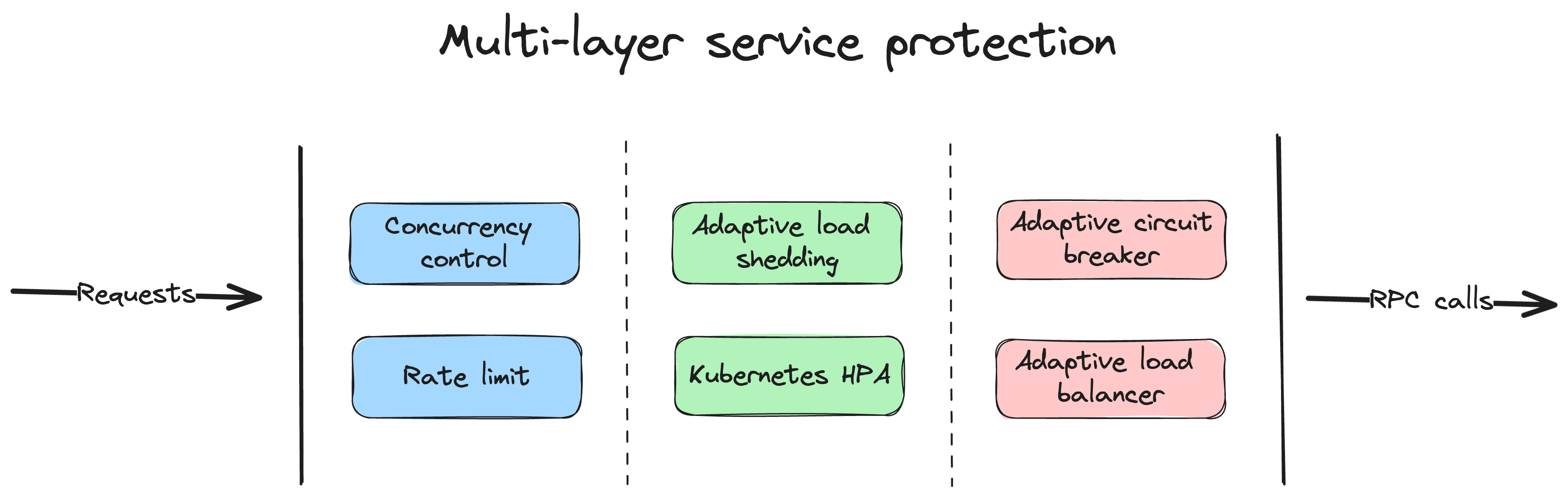
* builtin chained timeout control, concurrency control, rate limit, adaptive circuit breaker, adaptive load shedding, even no configuration needed
* builtin middlewares also can be integrated into your frameworks
* simple API syntax, one command to generate a couple of different languages
* auto validate the request parameters from clients
* plenty of builtin microservice management and concurrent toolkits
go-zero (listed in CNCF Landscape: [https://landscape.cncf.io/?selected=go-zero](https://landscape.cncf.io/?selected=go-zero)) is a web and rpc framework with lots of builtin engineering practices. It’s born to ensure the stability of the busy services with resilience design and has been serving sites with tens of millions of users for years.
go-zero contains simple API description syntax and code generation tool called `goctl`. You can generate Go, iOS, Android, Kotlin, Dart, TypeScript, JavaScript from .api files with `goctl`.
#### Advantages of go-zero:
* improve the stability of the services with tens of millions of daily active users
* builtin chained timeout control, concurrency control, rate limit, adaptive circuit breaker, adaptive load shedding, even no configuration needed
* builtin middlewares also can be integrated into your frameworks
* simple API syntax, one command to generate a couple of different languages
* auto validate the request parameters from clients
* plenty of builtin microservice management and concurrent toolkits
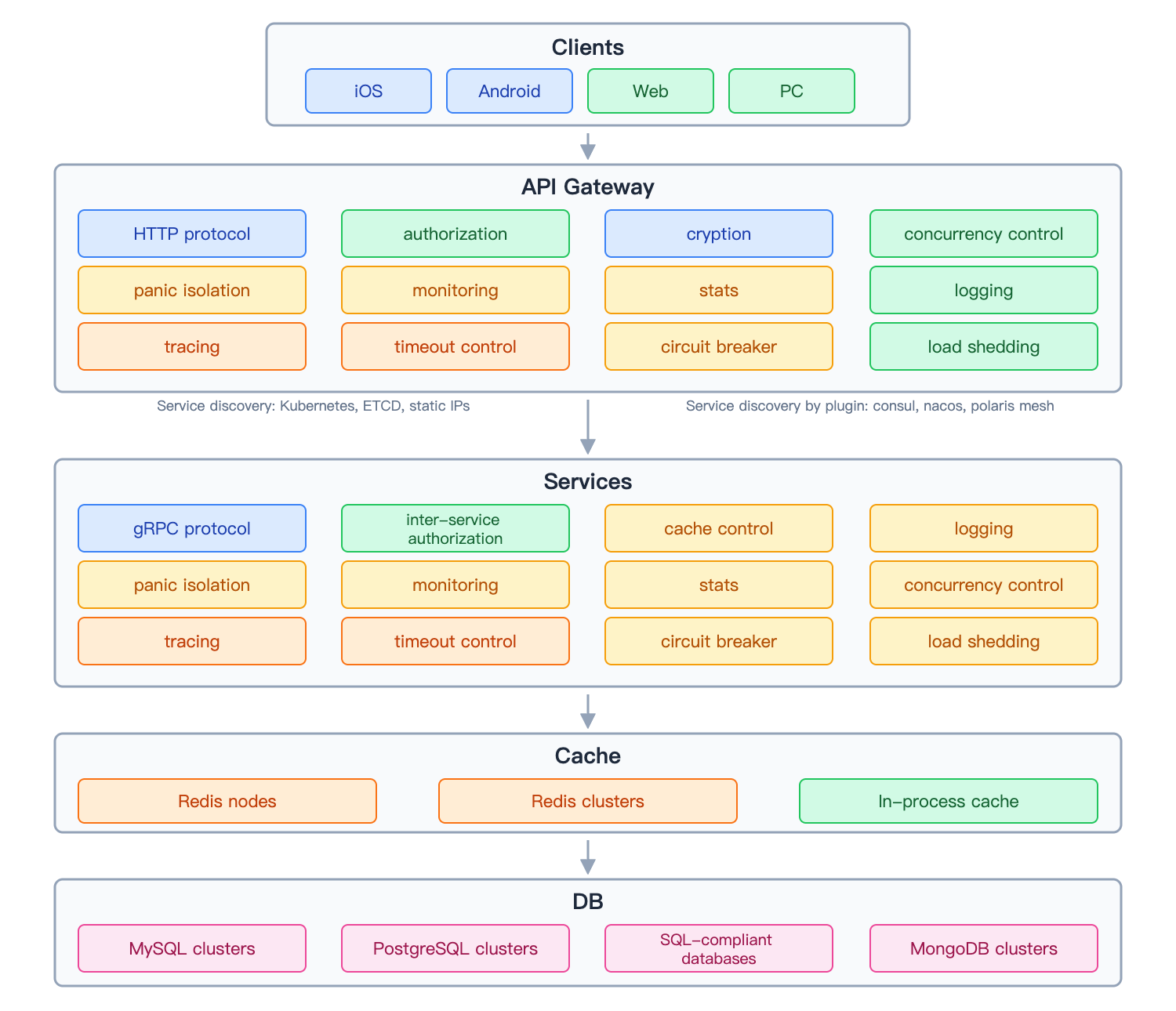 ## Backgrounds of go-zero
At the beginning of 2018, we decided to re-design our system, from monolithic architecture with Java+MongoDB to microservice architecture. After research and comparison, we chose to:
* Golang based
* great performance
* simple syntax
* proven engineering efficiency
* extreme deployment experience
* less server resource consumption
* Self-designed microservice architecture
* I have rich experience in designing microservice architectures
* easy to locate the problems
* easy to extend the features
## Design considerations on go-zero
By designing the microservice architecture, we expected to ensure stability, as well as productivity. And from just the beginning, we have the following design principles:
* keep it simple
* high availability
* stable on high concurrency
* easy to extend
* resilience design, failure-oriented programming
* try best to be friendly to the business logic development, encapsulate the complexity
* one thing, one way
After almost half a year, we finished the transfer from a monolithic system to microservice system and deployed on August 2018. The new system guaranteed business growth and system stability.
## The implementation and features of go-zero
go-zero is a web and rpc framework that integrates lots of engineering practices. The features are mainly listed below:
* powerful tool included, less code to write
* simple interfaces
* fully compatible with net/http
* middlewares are supported, easy to extend
* high performance
* failure-oriented programming, resilience design
* builtin service discovery, load balancing
* builtin concurrency control, adaptive circuit breaker, adaptive load shedding, auto-trigger, auto recover
* auto validation of API request parameters
* chained timeout control
* auto management of data caching
* call tracing, metrics, and monitoring
* high concurrency protected
As below, go-zero protects the system with a couple of layers and mechanisms:
## The simplified architecture that we use with go-zero
## Backgrounds of go-zero
At the beginning of 2018, we decided to re-design our system, from monolithic architecture with Java+MongoDB to microservice architecture. After research and comparison, we chose to:
* Golang based
* great performance
* simple syntax
* proven engineering efficiency
* extreme deployment experience
* less server resource consumption
* Self-designed microservice architecture
* I have rich experience in designing microservice architectures
* easy to locate the problems
* easy to extend the features
## Design considerations on go-zero
By designing the microservice architecture, we expected to ensure stability, as well as productivity. And from just the beginning, we have the following design principles:
* keep it simple
* high availability
* stable on high concurrency
* easy to extend
* resilience design, failure-oriented programming
* try best to be friendly to the business logic development, encapsulate the complexity
* one thing, one way
After almost half a year, we finished the transfer from a monolithic system to microservice system and deployed on August 2018. The new system guaranteed business growth and system stability.
## The implementation and features of go-zero
go-zero is a web and rpc framework that integrates lots of engineering practices. The features are mainly listed below:
* powerful tool included, less code to write
* simple interfaces
* fully compatible with net/http
* middlewares are supported, easy to extend
* high performance
* failure-oriented programming, resilience design
* builtin service discovery, load balancing
* builtin concurrency control, adaptive circuit breaker, adaptive load shedding, auto-trigger, auto recover
* auto validation of API request parameters
* chained timeout control
* auto management of data caching
* call tracing, metrics, and monitoring
* high concurrency protected
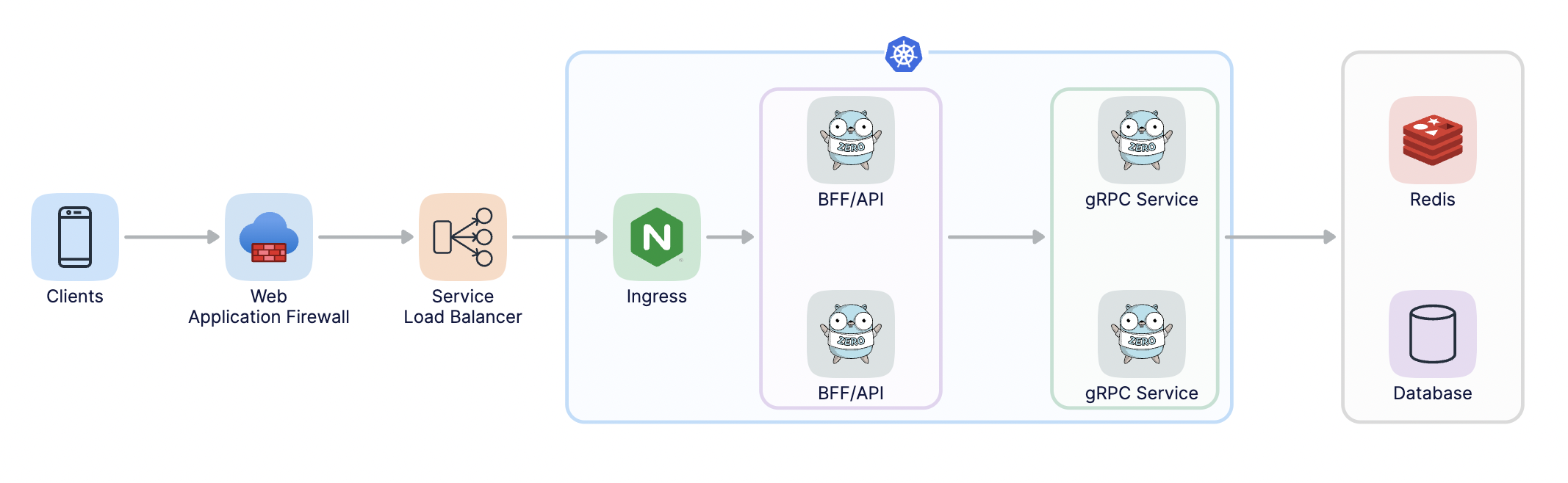
As below, go-zero protects the system with a couple of layers and mechanisms:

## The simplified architecture that we use with go-zero
 ## Installation
Run the following command under your project:
```shell
go get -u github.com/zeromicro/go-zero
```
## Upgrade
To upgrade from versions eariler than v1.3.0, run the following commands.
```shell
go install github.com/zeromicro/go-zero/tools/goctl@latest
```
```shell
goctl migrate —verbose —version v1.5.0
```
## Quick Start
1. full examples can be checked out from below:
[Rapid development of microservice systems](https://github.com/zeromicro/zero-doc/blob/main/doc/shorturl-en.md)
[Rapid development of microservice systems - multiple RPCs](https://github.com/zeromicro/zero-doc/blob/main/docs/zero/bookstore-en.md)
2. install goctl
`goctl`can be read as `go control`. `goctl` means not to be controlled by code, instead, we control it. The inside `go` is not `golang`. At the very beginning, I was expecting it to help us improve productivity, and make our lives easier.
```shell
# for Go
go install github.com/zeromicro/go-zero/tools/goctl@latest
# For Mac
brew install goctl
# docker for amd64 architecture
docker pull kevinwan/goctl
# run goctl like
docker run --rm -it -v `pwd`:/app kevinwan/goctl goctl --help
# docker for arm64 (M1) architecture
docker pull kevinwan/goctl:latest-arm64
# run goctl like
docker run --rm -it -v `pwd`:/app kevinwan/goctl:latest-arm64 goctl --help
```
make sure goctl is executable.
3. create the API file, like greet.api, you can install the plugin of goctl in vs code, api syntax is supported.
```go
type (
Request {
Name string `path:"name,options=[you,me]"` // parameters are auto validated
}
Response {
Message string `json:"message"`
}
)
service greet-api {
@handler GreetHandler
get /greet/from/:name(Request) returns (Response)
}
```
the .api files also can be generated by goctl, like below:
```shell
goctl api -o greet.api
```
4. generate the go server-side code
```shell
goctl api go -api greet.api -dir greet
```
the generated files look like:
```Plain Text
├── greet
│ ├── etc
│ │ └── greet-api.yaml // configuration file
│ ├── greet.go // main file
│ └── internal
│ ├── config
│ │ └── config.go // configuration definition
│ ├── handler
│ │ ├── greethandler.go // get/put/post/delete routes are defined here
│ │ └── routes.go // routes list
│ ├── logic
│ │ └── greetlogic.go // request logic can be written here
│ ├── svc
│ │ └── servicecontext.go // service context, mysql/redis can be passed in here
│ └── types
│ └── types.go // request/response defined here
└── greet.api // api description file
```
the generated code can be run directly:
```shell
cd greet
go mod init
go mod tidy
go run greet.go -f etc/greet-api.yaml
```
by default, it’s listening on port 8888, while it can be changed in the configuration file.
you can check it by curl:
```shell
curl -i http://localhost:8888/greet/from/you
```
the response looks like below:
```http
HTTP/1.1 200 OK
Date: Sun, 30 Aug 2020 15:32:35 GMT
Content-Length: 0
```
5. Write the business logic code
* the dependencies can be passed into the logic within servicecontext.go, like mysql, reds, etc.
* add the logic code in a logic package according to .api file
6. Generate code like Java, TypeScript, Dart, JavaScript, etc. just from the api file
```shell
goctl api java -api greet.api -dir greet
goctl api dart -api greet.api -dir greet
...
```
## Benchmark
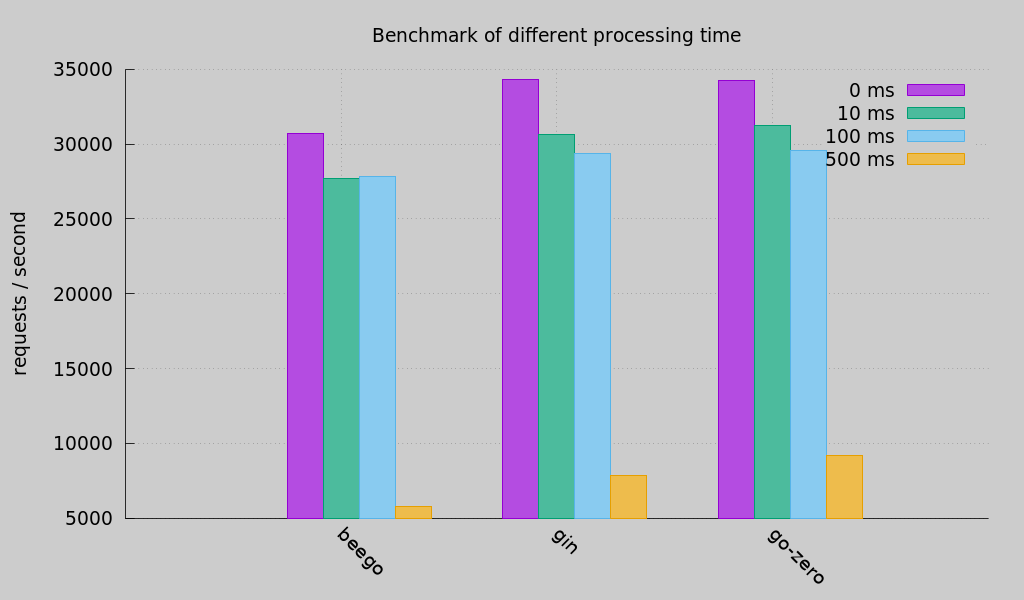
[Checkout the test code](https://github.com/smallnest/go-web-framework-benchmark)
## Documents
* [Documents](https://go-zero.dev/)
* [Rapid development of microservice systems](https://github.com/zeromicro/zero-doc/blob/main/doc/shorturl-en.md)
* [Rapid development of microservice systems - multiple RPCs](https://github.com/zeromicro/zero-doc/blob/main/docs/zero/bookstore-en.md)
* [Examples](https://github.com/zeromicro/zero-examples)
## Chat group
Join the chat via https://discord.gg/4JQvC5A4Fe
## Cloud Native Landscape
## Installation
Run the following command under your project:
```shell
go get -u github.com/zeromicro/go-zero
```
## Upgrade
To upgrade from versions eariler than v1.3.0, run the following commands.
```shell
go install github.com/zeromicro/go-zero/tools/goctl@latest
```
```shell
goctl migrate —verbose —version v1.5.0
```
## Quick Start
1. full examples can be checked out from below:
[Rapid development of microservice systems](https://github.com/zeromicro/zero-doc/blob/main/doc/shorturl-en.md)
[Rapid development of microservice systems - multiple RPCs](https://github.com/zeromicro/zero-doc/blob/main/docs/zero/bookstore-en.md)
2. install goctl
`goctl`can be read as `go control`. `goctl` means not to be controlled by code, instead, we control it. The inside `go` is not `golang`. At the very beginning, I was expecting it to help us improve productivity, and make our lives easier.
```shell
# for Go
go install github.com/zeromicro/go-zero/tools/goctl@latest
# For Mac
brew install goctl
# docker for amd64 architecture
docker pull kevinwan/goctl
# run goctl like
docker run --rm -it -v `pwd`:/app kevinwan/goctl goctl --help
# docker for arm64 (M1) architecture
docker pull kevinwan/goctl:latest-arm64
# run goctl like
docker run --rm -it -v `pwd`:/app kevinwan/goctl:latest-arm64 goctl --help
```
make sure goctl is executable.
3. create the API file, like greet.api, you can install the plugin of goctl in vs code, api syntax is supported.
```go
type (
Request {
Name string `path:"name,options=[you,me]"` // parameters are auto validated
}
Response {
Message string `json:"message"`
}
)
service greet-api {
@handler GreetHandler
get /greet/from/:name(Request) returns (Response)
}
```
the .api files also can be generated by goctl, like below:
```shell
goctl api -o greet.api
```
4. generate the go server-side code
```shell
goctl api go -api greet.api -dir greet
```
the generated files look like:
```Plain Text
├── greet
│ ├── etc
│ │ └── greet-api.yaml // configuration file
│ ├── greet.go // main file
│ └── internal
│ ├── config
│ │ └── config.go // configuration definition
│ ├── handler
│ │ ├── greethandler.go // get/put/post/delete routes are defined here
│ │ └── routes.go // routes list
│ ├── logic
│ │ └── greetlogic.go // request logic can be written here
│ ├── svc
│ │ └── servicecontext.go // service context, mysql/redis can be passed in here
│ └── types
│ └── types.go // request/response defined here
└── greet.api // api description file
```
the generated code can be run directly:
```shell
cd greet
go mod init
go mod tidy
go run greet.go -f etc/greet-api.yaml
```
by default, it’s listening on port 8888, while it can be changed in the configuration file.
you can check it by curl:
```shell
curl -i http://localhost:8888/greet/from/you
```
the response looks like below:
```http
HTTP/1.1 200 OK
Date: Sun, 30 Aug 2020 15:32:35 GMT
Content-Length: 0
```
5. Write the business logic code
* the dependencies can be passed into the logic within servicecontext.go, like mysql, reds, etc.
* add the logic code in a logic package according to .api file
6. Generate code like Java, TypeScript, Dart, JavaScript, etc. just from the api file
```shell
goctl api java -api greet.api -dir greet
goctl api dart -api greet.api -dir greet
...
```
## Benchmark

[Checkout the test code](https://github.com/smallnest/go-web-framework-benchmark)
## Documents
* [Documents](https://go-zero.dev/)
* [Rapid development of microservice systems](https://github.com/zeromicro/zero-doc/blob/main/doc/shorturl-en.md)
* [Rapid development of microservice systems - multiple RPCs](https://github.com/zeromicro/zero-doc/blob/main/docs/zero/bookstore-en.md)
* [Examples](https://github.com/zeromicro/zero-examples)
## Chat group
Join the chat via https://discord.gg/4JQvC5A4Fe
## Cloud Native Landscape


